Generating XML Serialization Assemblies
By Eric — — 2 minute readThe .NET XML serialization support is pretty cool -- I've used it for a few projects now. It provides an easy way to convert objects with properties to and from XML. The implementation dynamically generates a serialization assembly to do this at runtime, so a recommended strategy for improving runtime performance is to generate your serialization assemblies in advance using the XML Serializer Generator Tool (Sgen.exe).
I spent an embarrassingly long time coming up with the right commands for a post-build step to run sgen.exe as part of a project's build process, but this is what I ultimately came up with:
cd "$(SolutionDir)"
"$(DevEnvDir)../../SDK/v2.0/Bin/sgen.exe" /assembly:"$(TargetPath)" /parsableerrors /force /compiler:/keyfile:NextPage.snk
Then I happened to notice an item on the project's Build tab saying "Generate serialization assembly" with a drop-down next to it, containing values "Auto", "On" and "Off". I started feeling kind of dumb for having spent so much time on my command line when I could presumably just pick something in the dropdown and Visual Studio would automatically figure the sgen.exe command line for me.
I thought I'd give it a try. I'm not quite sure what "Auto" means (and the documentation doesn't really help), but surely "On" would be a reasonable choice for a project that I'm sure uses XML serialization. Woohoo! There in the output window is a call to sgen.exe! That was easy. But, um, hold on... No actual serialization assembly was generated.
There was a
thread
on the MSDN Forums where someone pointed out that the IDE's version of
the sgen.exe command line included the switch /proxytypes, which,
according to the documentation "Generates serialization code only for
the XML Web service proxy types." Since I'm not doing a web service, the
IDE's option is mostly useless.
It is not, however, entirely useless. If you happen to be building an installer for your project in Visual Studio, turning on (that is "On") serialization assembly generation lets installer projects pick up the serialization assemblies even if they were created using a post-build step like mine above. For the install project, you can add the project output group for XML Serialization Assemblies:
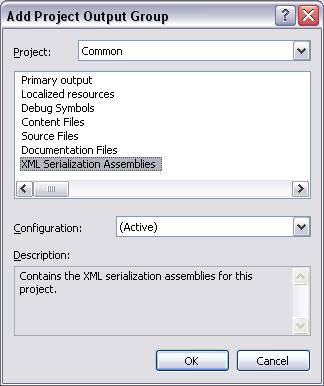
If you don't have the "Generate serialization assemblies" option set to "On" in your main project, then the install project won't pick up the serialization assembly, even though it is sitting there nicely in the output directory.